Idle Pull Requests: Find the Right Blocker With GitHub’s New Overview
GitHub’s new pull request Overview makes blockers easier to diagnose. Learn how idle PR distributions help teams decide which open pull request to inspect first.
By Ahmad Hajjar
GitHub released a new pull request Overview page in public preview on November 5, 2026. It puts merge readiness, checks, comments, approvals, and available actions at the top of a pull request.
That makes one pull request easier to diagnose. It does not tell a team which pull request in a large queue deserves attention first.
The missing link is idle time. First use the age distribution of open pull requests to find work that has stopped moving. Then use GitHub's Overview to identify the specific blocker.
What GitHub shipped
GitHub described the problem as “finding what’s blocking progress.” The new Overview replaces the familiar merge box with a compact readiness summary. It links directly to failing checks, missing approvals, relevant comments, and actions such as updating a branch.
The preview also adds filters for unresolved conversations and comments you wrote. Comments can be sorted newest first. A recent-activity summary brings review comments and review requests together.
This is an opt-in public preview. GitHub said rollout would continue through the weekend after the November 5 announcement, and the classic view remains available.
Early feedback shows why the preview should be evaluated as a workflow change. In GitHub's public discussion, Simon Abbott called status at a glance “a huge win.” He also wrote that newest-first sorting was “really hard to read” and said the split timelines made force-push history harder to follow.
The debate is useful. A summary can reduce search time without preserving every investigator's preferred context. Teams should test both the faster path to current status and the path back through important history.
A per-PR overview does not prioritize the queue
GitHub's Overview begins after someone has opened a pull request.
An engineering manager or reviewer often has an earlier question: which open pull request should I inspect?
Sorting only by creation date is a weak answer. A recent PR can already be waiting on a human response. An older PR may have received a review this morning. The useful measure is time since human review activity, applied across every currently open PR.
GitQuick calls this idle time. The clock starts at the last human review. If no human review exists, it starts when the PR opened. Commits and comments do not reset it. Closed and merged PRs are excluded.
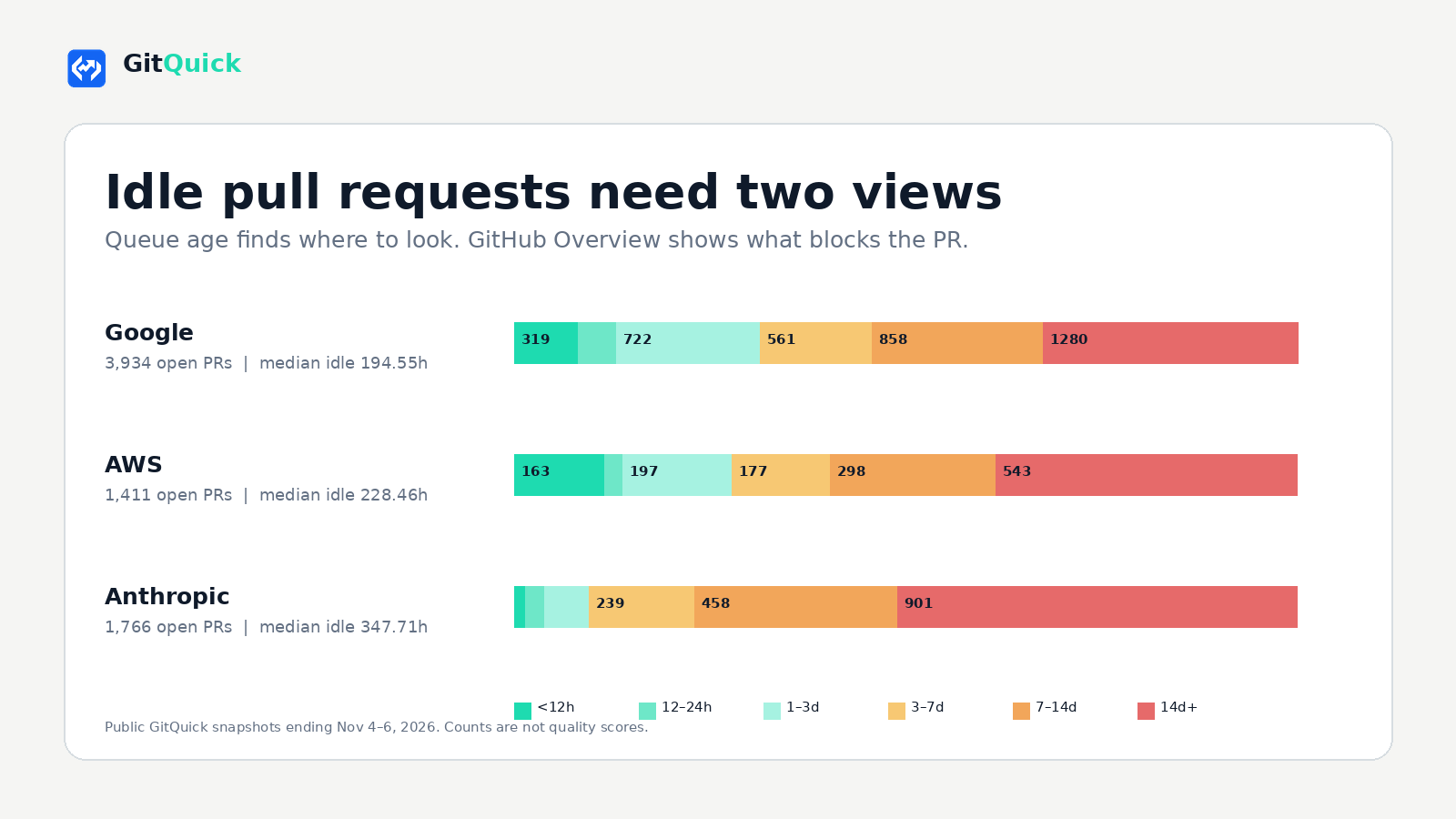
The median idle time is the middle observed value across all currently open pull requests. GitQuick also groups the queue into six buckets: under 12 hours, 12 to 24 hours, 1 to 3 days, 3 to 7 days, 7 to 14 days, and 14 days or more.
This distribution is more useful than a single stale threshold. It shows whether delay is concentrated in a few old items or spread across the queue.
What current public queues look like
GitQuick's public Showcase listed 21 organizations when these snapshots were fetched on November 6, 2026. The table uses three recent one-month organization runs. Each median is paired with the number of currently open PRs in its sample.
| Organization | Snapshot window | Median idle time and sample | Idle at least 72h |
|---|---|---|---|
| Oct 6 to Nov 6 | 194.55h, n=3,934 open PRs | 2,699 | |
| AWS | Oct 5 to Nov 5 | 228.46h, n=1,411 open PRs | 1,018 |
| Anthropic | Oct 4 to Nov 4 | 347.71h, n=1,766 open PRs | 1,598 |
These rows are examples, not rankings. The organizations have different repositories, contribution models, automation, and triage policies. An open pull request can also be intentionally paused.
The distributions still show why a queue view matters. In each snapshot, the median currently open PR had gone more than eight days without a human review. Opening one PR's Overview can reveal its checks and approvals. It cannot reveal that the organization has hundreds or thousands of other open PRs with similar or greater idle time.
Use the two views in sequence
A practical triage loop has four steps.
- Find the age band that needs attention. Start with the idle distribution. A growing 3 to 7 day bucket may need different handling from a large 14 day or older bucket.
- Open the specific pull request. Use the drill-down to select the oldest or most relevant item. Repository ownership and business context still matter.
- Diagnose the current blocker in Overview. Check failing workflows, unresolved conversations, review requests, approvals, branch status, and merge readiness.
- Inspect history before acting. If the branch was force-pushed, requirements changed, or an earlier decision matters, read the timeline and diff history. The compact summary is a starting point, not a complete audit trail.
The action should match the evidence. Request a review when the work is active and waiting. Update a branch when GitHub shows it is behind. Resolve a conversation only after the concern is addressed. Convert unfinished work to draft or close work that no longer has an owner.
What the metric cannot prove
Idle time identifies absence of a recorded human review. It does not identify the cause.
Public GitHub metadata cannot show whether a reviewer is evaluating the change offline, whether a PR is deliberately paused, whether another project has higher priority, or whether the code is good. A long idle time is a reason to inspect the pull request, not a verdict on the author or team.
The metric also has a specific boundary. Comments and commits do not reset GitQuick's idle clock. A newly pushed commit can therefore coexist with a long period since the last human review. That is often exactly when a reviewer should check whether the new revision addressed earlier feedback.
Takeaway
GitHub's new Overview improves the moment after a reviewer chooses a pull request. Idle PR analytics improve the moment before that choice.
Use the queue distribution to decide where attention is needed. Use Overview to find the blocker and next action. Keep the timeline available when the summary omits context required for a safe decision.
For related analysis, read why stale PR queues stay invisible and how to find code review bottlenecks by repository.
Explore the live Google Showcase, AWS Showcase, or all public Showcases.
See your own idle pull request distribution
Disclaimer: This analysis uses public GitHub pull request and review metadata. Idle time measures time since the last recorded human review, or since opening when no human review exists. It does not measure code quality, developer performance, intent, blocker cause, or causality. GitQuick is not affiliated with or endorsed by GitHub or any organization mentioned.