GitHub Agent Merge: Measure Pull Request Automation After Approval
GitHub Agent Merge can fix CI failures and merge conflicts. Learn how to evaluate it with approval-to-merge median, p90, eligible samples, and a stable rollout cohort.
By Ahmad Hajjar
GitHub released Agent Merge for pull requests on October 28, 2026. The feature can watch a pull request and respond when a GitHub Actions workflow fails or the branch develops a merge conflict.
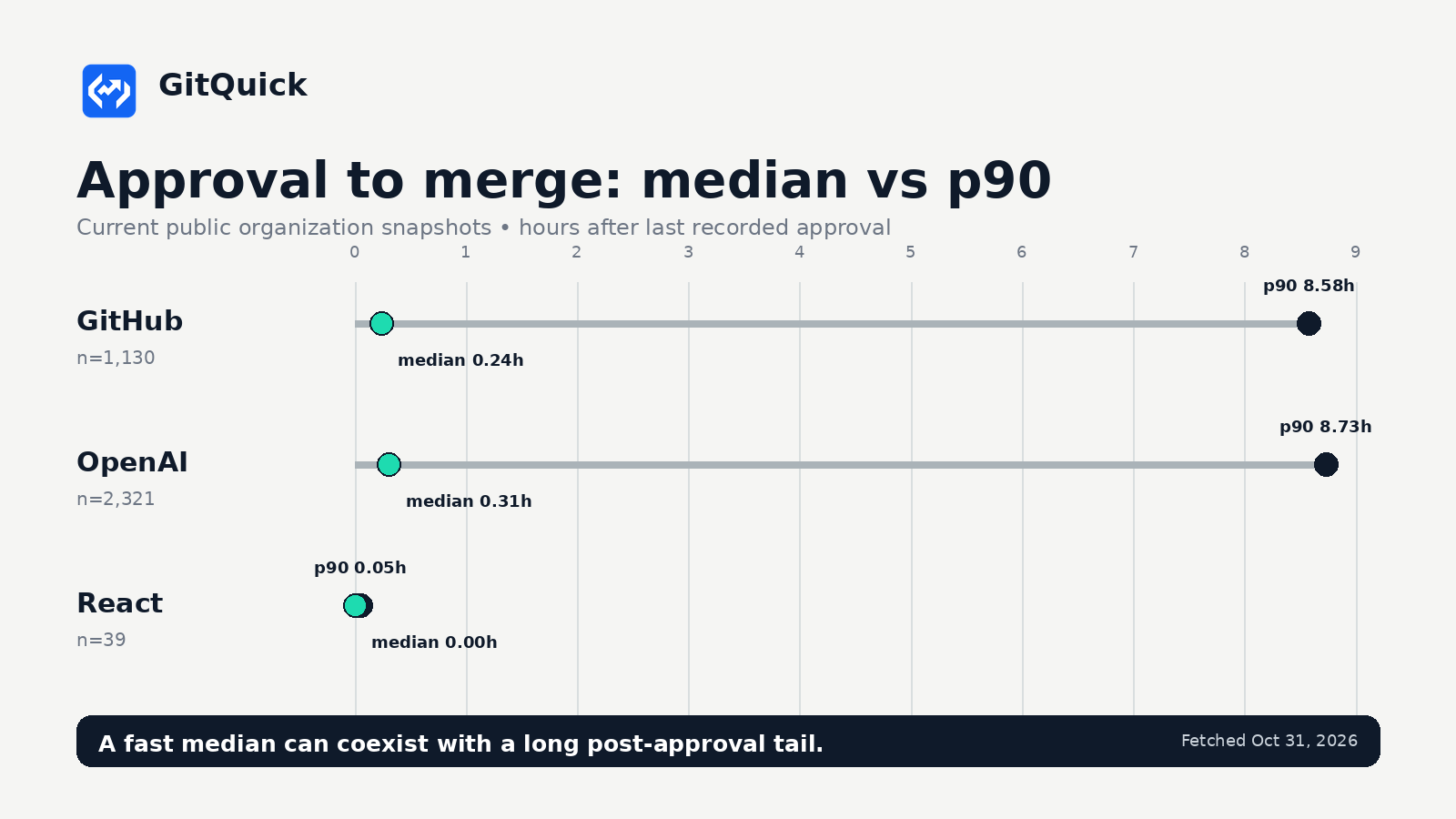
The chart shows the median and p90 approval-to-merge stage for three current GitQuick Showcase snapshots. Each row includes its eligible sample size.
This is a specific kind of automation. It acts after a pull request exists and only on selected merge blockers. Teams evaluating it should therefore measure the part of the workflow it can change, rather than expecting every pull request metric to improve.
What GitHub shipped on October 28
GitHub's release announcement says Agent Merge now works directly in pull requests on GitHub. A user selects Watch and fix in the merge box, then allows Copilot to fix failed Actions workflows, resolve merge conflicts, or both.
When a selected blocker appears, Copilot starts in a cloud development environment. GitHub describes the behavior as watching the PR and “automatically fixes blockers.” The feature can also run by default for pull requests created by the user who enables it.
Agent Merge and auto-merge are separate controls. Agent Merge attempts to remove selected blockers. Auto-merge completes the merge after repository requirements pass. GitHub's documentation is explicit that Agent Merge “does not replace your review” or the repository's merge requirements.
The cloud version does not support stacked pull requests or pull requests opened from forks. It also requires a paid Copilot plan, an organization policy that permits Copilot in the cloud, and the repository's automation policy to be enabled.
Why teams care about the post-approval stage
A pull request can finish review and still wait for CI, a merge queue, a branch update, a release window, or a person with merge permission. That wait is easy to hide inside total time to merge.
Agent Merge targets two named causes within that stage: failed Actions workflows and merge conflicts. It does not address every cause. A delayed deployment window, an unmet approval requirement, a manually paused release, or a non-GitHub CI system can leave the same metric unchanged.
This distinction matters for evaluation. A faster total merge time after adoption would be encouraging, but it would not prove that Agent Merge caused the change. Repository mix, contributor activity, PR size, review policy, and release timing may also move between measurement windows.
Measure approval to merge, with the tail
Approval-to-merge time is the interval from the last qualifying approval to the merge timestamp. It describes the recorded post-approval stage. The median is the middle eligible PR. The p90 is the value at or below which 90 percent of eligible PRs fall.
Use both. A low median with a high p90 means most approved PRs merge quickly while a smaller group waits much longer. That tail is where intermittent CI failures and conflict resolution may appear, although the timing alone cannot identify the cause.
GitQuick's public Showcase listed 21 organizations when these snapshots were fetched on October 31, 2026.
| Organization | Snapshot window | Approval-to-merge median | Approval-to-merge p90 | Eligible PRs |
|---|---|---|---|---|
| GitHub | Oct 1 to Oct 31, 2026 | 0.24h | 8.58h | 1,130 |
| OpenAI | Sep 29 to Oct 29, 2026 | 0.31h | 8.73h | 2,321 |
| React | Sep 27 to Oct 27, 2026 | 0.00h | 0.05h | 39 |
Every stage statistic uses its own eligible sample. The 1,130 GitHub PRs in the approval-to-merge sample are not the same denominator as all 3,469 merged PRs in that snapshot. Do not treat the stage sample as a funnel total or subtract one stage's sample from another.
The rows are examples, not rankings. These organizations differ in repository mix, contribution model, branch policy, automation, and release process. Public GitHub metadata also cannot tell us whether Agent Merge was enabled on any PR in the table.
A practical rollout measurement plan
Start with a small repository group where failed GitHub Actions runs or merge conflicts are already a known source of delay. Record the rollout date and which Agent Merge actions are enabled.
Compare equivalent windows before and after the change. Keep repository scope and filters stable. Track:
- approval-to-merge median, p90, and sample size;
- total time-to-merge median and p90 as a secondary outcome;
- changes-requested and later-approval activity, because automated fixes can create new review work;
- PR size and repository mix, which can change the difficulty of both review and conflict resolution.
Then inspect the slowest post-approval PRs. Timing data can show that work waited, but GitQuick does not currently ingest Agent Merge enrollment, its allowed actions, individual remediation attempts, or CI failure causes. Use GitHub timeline events and Actions logs to verify what happened on those PRs.
Do not add stage medians together. Each median can describe a different middle PR. Do not infer hours saved from two organization-level snapshots unless the cohorts and rollout conditions are comparable.
GitQuick's Trend and Compare views can keep the scope consistent across runs and expose the median, p90, and eligible samples. Its Merge Pipeline Friction signal flags elevated post-approval delay and an unusually long tail. These are investigation tools, not proof of Agent Merge effectiveness.
Takeaway
Agent Merge gives teams a new way to respond to failed Actions workflows and merge conflicts after a pull request is open. Its release does not make total merge time the only success metric.
Measure the stage the automation can affect. Pair the approval-to-merge median with p90 and sample size. Annotate the rollout, keep the repository cohort stable, and inspect the slow PRs in GitHub before attributing a change to automation.
For related guidance, read Your PRs Are Approved. Why Aren't They Merging? and Did Your Code Review Process Actually Improve?.
Explore the GitHub public Showcase, compare all public organizations, or try GitQuick on your organization.
Disclaimer: GitQuick uses public GitHub metadata for the Showcase. The snapshots cover the organization-wide windows shown above and were fetched on October 31, 2026. Public metadata cannot identify Agent Merge adoption, blocker cause, code quality, developer performance, or causality. GitQuick is not affiliated with or endorsed by GitHub or any organization mentioned.