Same Code, More Pull Requests: Why Your PR Metrics Need Context
Feature merges, release promotions, and backports can change PR throughput and latency without changing review performance. Check the target branches behind the numbers.
By Ahmad Hajjar
Two teams can merge the same change and record different amounts of pull request activity.
One merges a feature branch into main. The other merges it into develop, includes it in a release PR into main, and later backports it to a supported release branch. Both workflows can be reasonable. Their PR totals describe different work.
Before treating higher throughput or lower merge time as an improvement, check which target branches the dashboard includes.
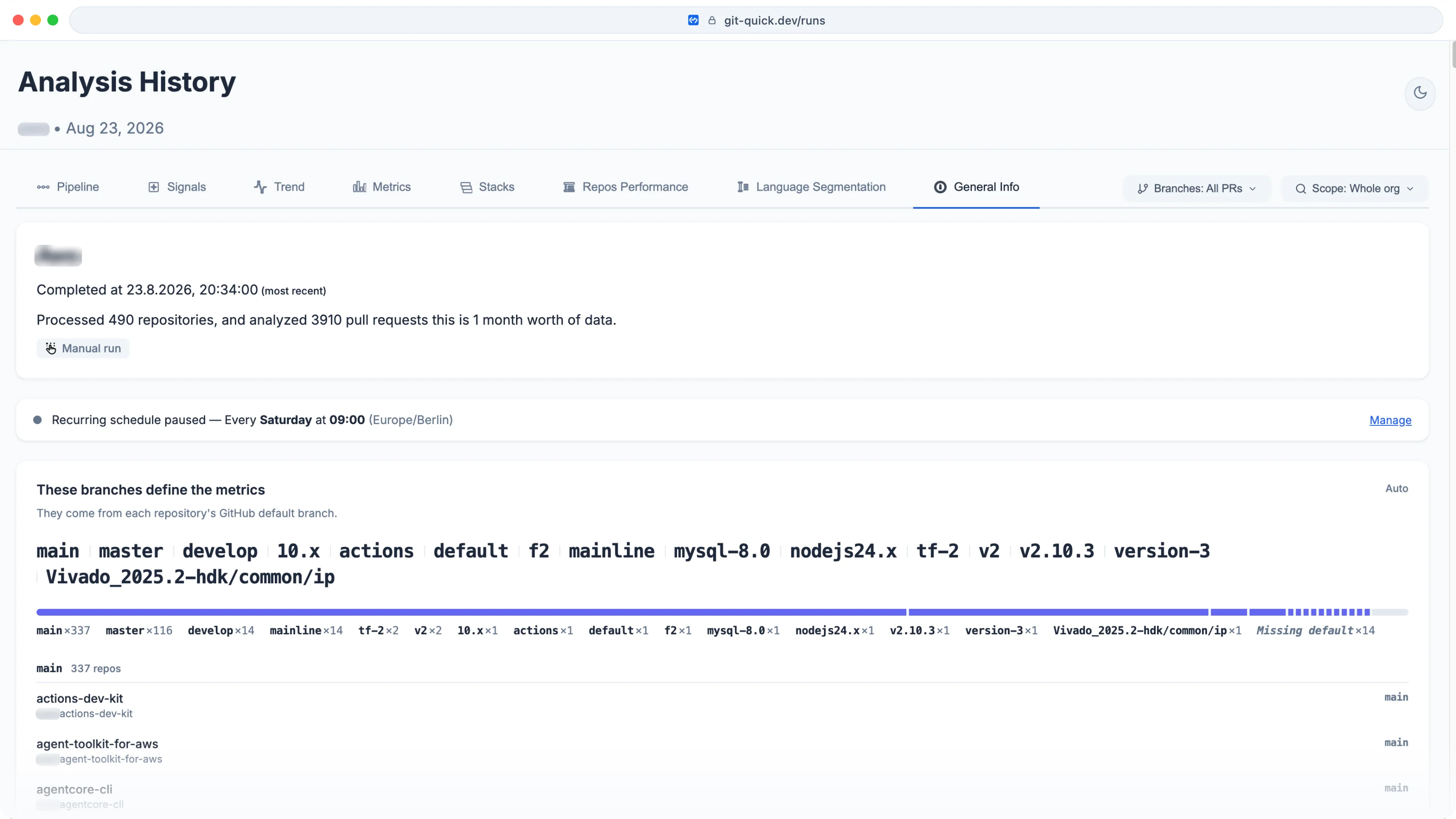
Historical product screenshot from 23 August 2026. The figures illustrate the interface, not current showcase benchmarks.
A PR count is not a feature count
GitHub defines a pull request as a proposal to merge changes from one branch into another. The source is the head branch; the destination is the base, or target, branch.
That definition matters when the same change moves through several branches. Consider this illustrative workflow:
| PR | Target branch | What the merge represents |
|---|---|---|
| Feature into integration | develop |
New work accepted into the integration branch |
| Release promotion | main |
A batch of integrated changes accepted for release |
| Backport | release/1.4 |
A change applied to an older supported version |
These are separate PRs. Some of their code may overlap. One release PR may also contain many features.
Counting all of them answers how much PR activity occurred. It does not establish how many distinct features reached users.
The same distinction applies to PR size. A release promotion can have a larger diff because it collects work from several earlier PRs. Mixing it with individual feature PRs changes the size distribution you are interpreting.
The same metric can answer different questions
For feature PRs targeting an integration branch, open-to-merge time can help you understand how long proposed work takes to get accepted.
For a release PR opened ahead of a scheduled release, the same interval can include a deliberate wait for that schedule. A higher median could reflect more release PRs in the sample, even if feature review behavior stayed the same.
Review coverage needs similar context. A release PR without its own recorded review may carry changes reviewed in earlier PRs. That does not establish that the release was safe, or that the release PR should bypass review. It means the metric describes review recorded on that PR. Check the underlying PRs and the team's release policy before drawing a conclusion about the code.
A branch name alone cannot resolve this. GitHub lets repositories choose their default branch. main might receive individual features in one repository and release promotions in another.
If both types of PR target main in the same repository, a target-branch filter cannot separate them. You still need to inspect the PRs and understand the workflow.
A merge queue changes what happens after approval
GitHub's merge queue checks a proposed change against the latest target branch and changes ahead of it in the queue. It creates temporary branches for those checks.
Those temporary branches are not additional pull requests. The original PR's target branch remains the relevant filter.
What can change is the wait after approval. Required checks, queue ordering, and failed validation can all affect when an approved PR merges.
An approval-to-merge interval can reveal that wait. It cannot, by itself, separate queue time from CI time, release scheduling, or another policy. Inspect the queue timeline and checks before choosing the fix.
This is why breaking cycle time into stages helps. First-review delay and delay after approval point to different parts of the process.
Choose the PR population before reading the trend
GitQuick's Branches selector filters metrics by target branch, and General Info shows the configured strategy alongside repository default branches. Auto configuration collects default-branch names across the organization; custom patterns let you define the target branches relevant to your workflow.
A practical review takes five steps:
- Name the question. Are you investigating feature review, release promotion, or maintenance work? Choose the PRs that can answer it.
- Check General Info. Read the “These branches define the metrics” section. Confirm what those names mean in the repositories you are analyzing.
- Check the active Branches selection. All PRs includes every target branch. Key branches combines the configured patterns. An individual pattern selects a narrower population. Add patterns such as
developorrelease/*through the branching-strategy editor on your own organization when needed. - Keep the comparison consistent. Use the same repository scope, branch selection, reviewer segment, and analysis-window length. Read the median and P90, the value at the 90th percentile, alongside the number of eligible PRs.
- Investigate a changed population. If repositories, branch patterns, or the workflow changed, establish a comparable baseline before attributing the difference to faster review or an AI tool.
Filtering answers a specific question. Keep the wider view available so excluded work does not disappear from operational attention.
For example, a team that changes from direct feature merges into main to integration through develop needs to revisit its baseline. Continuing to measure only main would now focus on a different step. Leaving every PR together would mix both steps.
Neither choice is automatically wrong. Each needs a clear interpretation.
PR merge time stops before production
DORA's software delivery guidance defines change lead time from a commit to deployment in production. It also cautions against blending metrics across applications with different contexts.
PR open-to-merge time covers a different interval. Merging into main does not prove that the change reached production, and a branch filter does not supply deployment evidence.
For PR comparisons, the practical implication is to check the workflow before interpreting the number. A shift in the mix of feature, release, and backport PRs can change an aggregate without changing how any one category performs.
Then look for the improvement within a consistent population: shorter waits, sustained review coverage, and fewer PRs stuck in the slow tail.
For another workflow that changes the unit of review, see GitHub Stacked Pull Requests: What Shipped and What to Measure.
Explore the public showcases, then check the target branches behind your own PR metrics.
Disclaimer: Workflow examples are illustrative, not measurements of a named organization. The product screenshot is historical. GitQuick measures GitHub PR metadata; these metrics do not establish code quality or production deployment. GitQuick is not affiliated with GitHub or DORA.